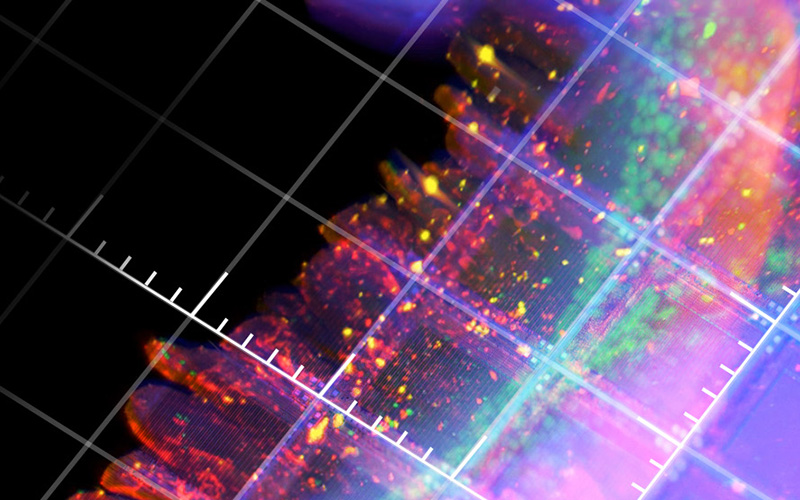
LuxBundle Software
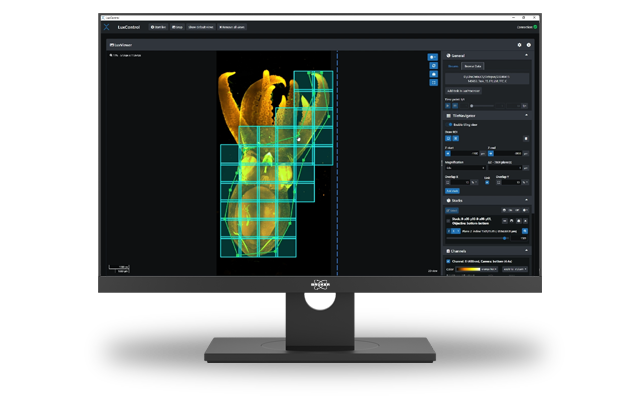
Comprehensive Data Analysis with LuxBundle Software
Bruker’s LuxBundle software suite features an intuitive interface, combining flexible image acquisition, on-the-fly data viewing, real-time data processing, and advanced post-processing capabilities into a single platform. It supports research using both simple linear workflows and complex multidimensional experiments with multiple asynchronous tasks. LuxBundle also adapts to user proficiency and has a fully scriptable open interface ready for custom smart microscopy workflows.
Enhanced Experiment Control, Image Acquisition, and Analysis
Bruker's LuxBundle software for light-sheet microscopes integrates LuxControl for data acquisition and microscope control, LuxProcessor Warp for data processing (during or after acquisition), LuxViewer for image viewing, and LuxDatahub RT for controlling data streams, image projections, and live views.
The new LuxTasks framework enables highly flexible, very easy connection of additional modules and functions into automated imaging, computing, and analysis workflows. These modules enable:
- User scripting and interaction and exchange with 3rd party software
- Distributed computing
- Automatically following the sample during acquisition with the SampleTracking Module
- Optimizing the setup of tiling experiments with the TileNavigator Module
- Vignetting-free image reconstruction with the Flatfield Module


LuxTasks Framework Connects Components
LuxTasks is LuxBundle’s new framework for flexible and easy connection of heterogeneous imaging and computational workloads, even when running on different workstations.
For example, it can free up the acquisition PC while performing real-time processing of data on a separate system (e.g., a Bruker Acquifer HIVE or a separate processing PC). The LuxTasks framework also enables smart microscopy experiments by interfacing with user scripts/programs, distributed computing, the LuxDatahub RT, and LuxProcessor Warp. These are essential steps when performing high-throughput light-sheet microscopy.
LuxTasks efficiently and easily connects:
- Microscope control and image acquisition
- Computer vision and image analysis
- Smart microscopy and feedback control
LuxControl Provides Microscope Control
LuxControl ensures experiment reproducibility by saving all parameters in image metadata, and configurations can be saved for future experiments. A fully scriptable open interface allows for custom smart microscopy and post-processing workflows. Similarly, all data output formats are compatible with common image processing software, such as Imaris, Aivia, BigDataViewer, Arivis, Fiji, Python, Matlab, and Napari.


Add-On Modules:
LuxProcessor Warp for Powerful Image Processing
The LuxProcessor is an effective tool for managing light-sheet microscopy data processing. LuxProcessor was redesigned and further improved to process complex data, including time series, multi-channel data, large sets of tiled stacks, and stack sets acquired under multiple angles. Now called LuxProcessor Warp, this tool can be chained with tasks from other scripts and programs for processing, analysis, AI, and smart microscopy.
LuxProcessor Warp generates high-quality images ready for in-depth exploration by providing the following features:
- Multi-color alignment
- Tile stitching of hundreds of tiles for large samples
- Multi-view image fusion
- Time point registration to compensate for sample motion (post-acquisition)
- Deconvolution
- Various tools for image processing, such as maximum intensity projection, output compression, and ratio-imaging
LuxViewer lets Researchers Interact with Data
LuxViewer is the visual hub to interact with microscopy data. It allows users to inspect the entire dataset and gives them control over their data with key capabilities, including:
- Fast viewing of multi-terabyte data sets, both raw and processed
- Viewing of data in 3D and over time
- Maximum intensity projections
- Toggle tile stitching on or off
- Draw and annotate regions of interest and set landmarks for registration
- Set up advanced tiling acquisitions using TileNavigator


LuxDatahub RT allows Live-Viewing, On-the-Fly MIPs, and Data Streams
The new LuxDatahub RT can do an incredible amount of real-time processing during acquisition, including image-data transforms for enhanced live view. These include multi-channel, multi-camera overlay and fusion, and more. The LuxDatahub RT can also create resolution pyramids, which lets researchers get their images prepared for Imaris, Fiji BigDataViewer, Napari, etc., during acquisition.
Other capabilities include robust copying/moving of acquired image data to remote drives or computers and the creation of maximum-intensity projections (MIPs) from all directions on the fly. Additionally, the LuxDatahub RT's LuxTasks interface enables connecting it smoothly to LuxProcessor Warp tasks or custom user scripts that run on the same or other computers.
Run Multiple Tasks at Once for Fast Results
LuxTasks enables the transfer of image acquisition to the acquisition computer, while reliably copying the images to an external drive or other system, such as the Acquifer HIVE.
LuxTasks Enables Smart Microscopy Experiments
Raw data of a mouse brain are registered and flatfield-corrected using the LuxProcessor Warp. This is followed by a user script using Noise2Void to create denoised data. These denoised data are then processed using a user script for subregion identification, including image segmentation, atlas registration, and subregion selection. Once the brain regions are detected, a third user script is applied to extract regions of interest (ROIs) for acquisition at higher resolution. The positional information and required acquisition settings are sent as automated commands to the microscope, which then automatically acquires higher-resolution data of the identified ROIs.
The figure on the right is an example of how smart microscopy-based decision making can be implemented to optimize experimental decision:

Enhance the Capabilities of Your Light-Sheet Software
SampleTracking Module
A big challenge for conventional time-lapse imaging that compromises data quality is sample movement or drifting over time. The SampleTracking module overcomes the issue of sample movement by automatically following the sample. This is achieved by the microscope stages automatically adjusting their position in 3D to keep the sample at the center. Whether it is a subtle drift or rapid motion in x, y, and z, SampleTracking adapts seamlessly to ensure each critical moment is captured.


TileNavigator Module
When acquiring large amounts of data, tile acquisition allows large sample acquisition with high resolution. Drawing a region of interest (ROI) can optimize the trade-off between the amount of data acquired and capturing the features of interest. Similarly, multi-position experiments can optimize data acquisition and save time.
The TileNavigator module allows interactive drawing of the area of interest. Whether it is a rectangular section or a freeform polygon, TileNavigator allows the drawing of precise outlines. Once the ROI is drawn, TileNavigator automatically generates a set of overlapping tiles that efficiently cover the entire sample. Additionally, this module enables fast navigation across large specimen or multiple objectives simply by selecting the relevant tile and the stages move automatically to the desired position.
Sample courtesy: Montserrat Coll Llado, EMBL, Barcelona
Flatfield Module
The Flatfield Module ensures artifact-free reconstructions. Typically, acquired images can show local variations of intensity in parts of the field of view (FOV). This artifact generally occurs at the image periphery and can be pronounced if multiple images are stitched together, which leads to a checkerboard pattern in the fused image.
This module applies computational flatfield correction, which restores even illumination across images. This creates uniform, artifact-free reconstruction of the large FOV data.
LEARN MORE:


Left: Maximum intensity projection of cleared mouse sample before the Flatfield Correction was applied. Right: Maximum intensity projection of cleared mouse sample after the Flatfield Correction was applied.
Sample Courtesy: Montserrat Coll Llado, EMBL, Barcelona.
Software Maintenance and Support
Image acquisition and processing is an ever-evolving process. To deliver the best experience for you, we now offer a Software Maintenance and Support Package for you.
- Continuous Software Development: Benefit from the newest software features and updates which ensure that LuxBundle remains at the forefront of technological advancements.
- Always Up-to-Date: Receive timely updates and hot fixes, keeping your system running smoothly.
- Software Support Service: Get support from our responsive team. From troubleshooting to answering your queries.